libsdl-1.2 support for OpenGL 3.2

This week we take a break from the C++ saga to talk a little about OpenGL. I’ve forked libsdl-1.2 and added support for creating OpenGL 3.2 forward-compatible contexts. This is something that could be deemed helpful until libsdl 2.0 is released.

You can find the source code on my GitHub page, at: github.com/alesegovia. In so far, only the Mac platform is supported, as it’s the only Operating System I currently have access to. I’ll hopefully be able to add Linux support as soon as I can get hold of a Linux box with a suitable video card.

Creating an OpenGL 3.2 compatible context is very simple. Once you have downloaded, compiled and installed libsdl-1.2-gl, you just need to create your window using the new SDL_OPENGLCORE flag.

This sample program creates an OpenGL 3.2 context, displays the OpenGL version number and exits:

#include <SDL.h>
#include <stdio.h>
#include <OpenGL/gl.h>

int main(int argc, char* argv[])
{
    SDL_Init(SDL_INIT_VIDEO);

    SDL_Surface* pSurface = SDL_SetVideoMode(600, 600, 32, SDL_OPENGL|SDL_OPENGLCORE);

    printf("GL Version:%s\n", glGetString(GL_VERSION));

    SDL_Quit();

    return 0;
}

You need to be running Mac OS X Lion or higher in order to be able to create OpenGL 3.2 contexts. If you are running Snow Leopard or your video card does not support OpenGL 3.2, you might get a Compatibility profile and your OpenGL version might be stuck on 2.1.

Also note that Mac OS X reports the OpenGL version to be 2.1 unless you specifically create forward-compatible OpenGL contexts, so if you need to know whether your Mac supports OpenGL 3.2, you can look your system configuration up in this great table maintained by Apple.

If you find this useful, let me know in the comments. Enjoy!

Light Scattering

When we introduced Programmable Pipeline support to Vortex Engine, we claimed that better visual effects could now be introduced into the renderer. With the introduction of Render-to-Texture functionality into Vortex 2.0, coupled with the power of Shaders, we can now make good on our promise.

Light Scattering (also known as “God Rays”) is a prime example of what can be achieved with Shaders and Render-to-Texture capabilities.

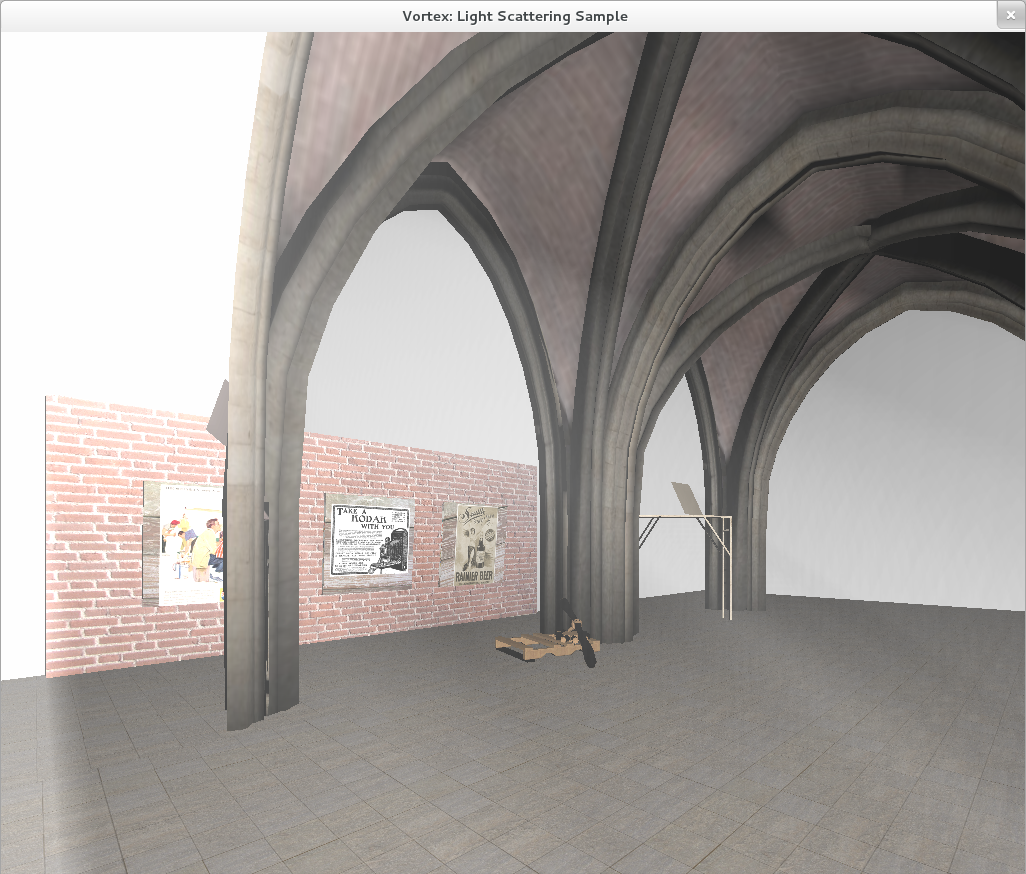
In the following image, a room consisting of an art gallery with tall pillars is depicted. We want to convey the effect of sun light coming from outside, illuminating the inner nave. Enter Light Scattering:

A Light Scattering algorithm is used for improving the visual experience. The scene is rendered using Vortex 2.0. Room courtesy of RealityFrontier. (Click to Enlarge)


It can be seen in the picture above how the the effect, although subtle, brings more life to the rendered scene. There is still much room to improve the visual results, though, particularily with the results of Kenny Mitchel’s article on GPU Gems 3.

There is also room for optimization. Currently, the scene is rendered in realtime at an average of 187 frames per second, producing 1024×1024 images on a NVIDIA GeForce GTX465. Moving the algorithm to mobile devices, although easy from a coding perspective, might require extra work to achieve a high frame rate on the embedded GPU.

Here are three more captures from different angles.

(Click to Enlarge)


(Click to Enlarge)

(Click to Enlarge)


A short detour along the way…

I wanted to improve the Stencil Shadow Volumes code a little bit and enable it for the Programmable Pipeline in Vortex, however, I had to take a small detour to fix an issue related to mobile device support.

It turns out that OpenGL ES, the 3D library that Vortex uses to render its graphics on mobile devices, does not support rendering indexed geometry for indices larger than 16 bits. Keep this in mind when developing for mobile devices such as the iPhone or iPad.

I can completely understand the reasoning behind this decision. 32-bit indices could be considered too much data to submit to the GPU in a mobile device. Furthermore, they are not strictly necessary, as they could be replaced (if needed) by splitting the geometry into two groups defined by 16-bit indices.

The solution I devised, which is now part of Vortex 2.0, is to allow the user to specify the data size for the indices when defining the geometry. This provides the flexibility to use 32, 16 or 8 bit indices. You can even have several geometric objects with different index sizes in a scene.

The advantage of leveraging this mechanism is that now it is very easy to fine-tune the number of bytes used for index representation for improving performance. For example, using 16-bit indices instead of 32-bit indices would make no difference for representing models composed of less than 65536 vertices, while requiring a copy of just half the number of bytes to the GPU.

In the extreme case of 8-bit indices we would be constrained to only 256 vertices, but we would be sending only one fourth of the data to the GPU.

This was mostly plumbing work, so no new picture this time. Stay tuned for more updates!

Stencil Shadow Volumes

I’ve built Stencil Shadow Volumes into the Vortex Engine.

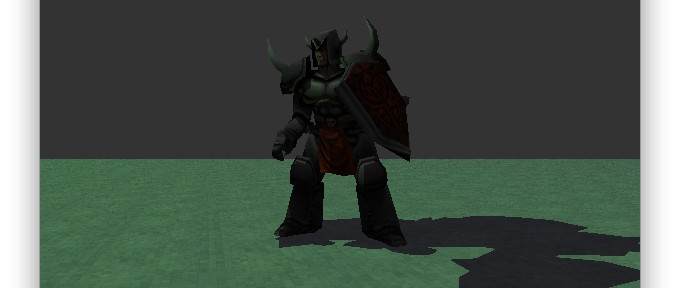
Shadows are a very interesting feature to implement in an renderer, as they provide important visual cues that help depict the relationship between objects in a scene. Notice in the following image how the shadow tells our brains that the Knight is standing on the floor (as opposed to hovering over it).

A Knight, lit by a green light, casts a shadow on a tiled floor.

The implementation is at this point no more than a prototype and requires significant more testing, however, since the visual results are very appealing, I wanted to share some of the images.

I personally have a bias towards using Shadows Volumes instead of Shadow Maps; I think the former algoritm leaves out much of the guesswork that Shadow Maps require. Furthermore, Shadow Volumes are not subject to some of the limitations of Shadow Maps, such as the map’s resolution.

Another point for Shadow Volumes is the fact that they provide a natural way to implement “soft shadows”: shadows that are not completely black but rather transparent. The following image corresponds to the same scene but with two minor changes: the light has been changed to white and the floor texture is different. Notice how we can see the floor texture englobed in the Knight’s translucent shadow.

The same knight, lit by a white light this time, casts a soft shadow on an industrial floor. Notice the shadow "translucency".

I hope we can have Shadow Volumes available for both rendering pipelines as part of Vortex 2.0.

Edit: Thanks to Gabriel G. for noting the term “soft shadows” was being used incorrectly.

iPhone OpenGL Retina Support

When Steve Jobs introduced the Retina Display feature for iPhone 4 and iPod Touch, he mentioned media content should be now adapted to the new devices, in order to make the most out of the high resolution available.

The introduction of Retina Displays took the resolution of the iPhone and iPod Touch devices from a 320×480 pixel screen up to a whooping 640×960 canvas. That’s 4 times more pixels to render. You can see the difference it produces in the following image: notice the area around the silhouette of the Gunner model.


A Retina Display-enabled OpenGL viewer (left) vs a Non-Retina Display Viewer (right).


While listening to the Keynote, I didn’t think OpenGL applications would have to be adapted, as OpenGL renders “on the fly” and I would’ve thought it would be enough just to set a bigger viewport. After testing one of my Apps on a Retina-enabled iPod touch however, I realized my Vortex-Engine Apps were not making use of the Retina Display, falling back to a low-res display mode.

After a little Googl’ing, I found the problem. It seems the EAGLView class I was using to create and manage my OpenGL contexts (taken from the Xcode OpenGL ES template) was accounting for the higher resolution by making every pixel 4 times as big! I guess this is something necessary to prevent content that would work fine on older devices to be shown using 1/4th of the screen size on Retina-enabled devices. On the other hand, it was wasting 3/4 of the pixels available on the newer devices, so something had to be made for this special case.

I found the solution to this problem in David Amador’s blog, (here’s the link: http://www.david-amador.com/2010/09/setting-opengl-view-for-iphone-4-retina-hi-resolution/). The idea he presents is to make use of the extra available pixels in Retina Displays by scaling the content up to 2X the size, that way we get rid of this “backwards-compatible” display mode. I rather think about it more like “halfing the pixels” in both directions.

In any case, here’s the code snippet needed to do that. Once we know the screen width and height (using the UIScreen singleton), we can add the following snippet to the EAGLView initWithCoder: method:

if (width == 640 && height == 960)
{
    // We have a Retina Display:
    self.contentScaleFactor = 2.0f;
    eaglLayer.contentsScale = 2.0f;
}

This will automatically make your OpenGL application take advantage of the extra pixels available in Retina Display devices. No further changes in your OpenGL code are needed, as long as you keep the binding from the EAGLLayer instance to your Viewport and RenderBuffer(s).

You can notice the difference these three lines make in the image above. Click on the image to see it in full size and prevent browser smoothing; you will notice the difference between Retina Display enabled OpenGL content (left) and non-Retina content (right).

Vortex-Engine has been patched and now happily supports newer and older generation devices ; )

Quake 2 Model Rendering

By mid June 2010 I worked on a personal project that consisted in rendering models from the classic Quake 2 game by Id Software. Here’s a video of the renderer.


Quake 2 was one of my favorite games when I was young and researching how to load and render its 3D models instantly sent me down the nostalgia path.

For those who might be interested in developing their own loader, Quake 2 models are very easy to read and parse from languages such as C and C++. This is mostly because .md2 files consist in a binary file format that we can easily read into C structs.

David Henry does a great job at explaining how the bytes are stored internally, so I’m not going to reproduce his work here. Nonetheless, here’s the md2 file header:

struct md2_header
{
     int id;
     int version;

     int skinwidth;
     int skinheight;

     int framesize;

     int numskins;
     int numvertices;
     int numtexcoords;
     int numtriangles;
     int numglcmds;
     int numframes;

     int skinDataOffset;
     int textureDataOffset;
     int triangleDataOffset;
     int frameDataOffset;
     int glcmdsDataOffset;
     int endOffset;
 };

Quake 2 model files organize vertices and triangles into keyframes: a series of poses that enable us to draw the model animated. The texture to use when rendering the model is referenced by the file too. Each file might point to zero or more textures in the PCX format. Textures are called the model’s “skin” in Quake 2′s terminology.

The video above were generated using the custom renderer that I wrote. It is using OpenGL and GLUT to create the window and draw the model.

Now, you’ve probably noticed that the animation in the video above looks rather “choppy”. It’s definitely not smooth. The reason is that keyframes provide a base for animating the model, but not enough frames are provided as to produce a “continuous” animation.

In my next post I’m going to show you how we can improve this situation. Stay tuned!

Quake 2 BSP Map Rendering

For the past month and a half I’ve been working on and off on a project that consists in the development of a custom Quake 2 BSP map renderer. The renderer was written from scratch using nothing but C++ and OpenGL 2.0.

Click on the image for more screenshots.

The project’s objective was twofold: to help develop the foundation for a custom object-oriented rendering engine and to test my skills at what seemed as such a daunting task as loading, rendering and navigating Quake 2 maps in realtime.

There is a lot of information on the Internet regarding Id Software’s BSP file format and the way polygons, texture data, lightmaps and any other aspects of the game are stored. In my experience, no website provides “the whole picture”, so if you’re planning on rolling your own renderer, be prepared to spend as much time doing research online and developing and testing ideas as writing code.

At its current status, I consider the renderer to be in a pretty good state, where it supports loading maps directly from Quake 2′s original PAK files, rendering its polygons, performing texture mapping, applying lightmaps, adding a skybox and leveraging the map’s visibility information to prevent large amounts of non-visible geometry from being sent to the Video Card. I’m glad I’ve been able to approximate the game’s look and feel in what I consider very close to the original.

There are still many open points that could be addressed, such as experimenting with blur effects to increase the sky’s realism and bring life into the skybox. All texture mapping and lighting is currently done using shaders, so the basic foundation for post production visual effects is laid and ready to be built upon.

At some point, I might provide executable versions of the renderer so you can try it yourself. In the mean time, if you’d like to view other rendered images, I’ve added more screenshots from this project at the Projects page of this site.

Here’s also a YouTube video showing an actual run of the Renderer:


Quake 2 and all of its art is Copyright (C) Id Software. Thanks to Id for creating such a great game.